


New article
Recently updated
Changing usernames in Mazlan Home (formerly Ideagen Hub)

Who is this article for?
Administrators who manage personnel.
Administrator permissions are required.
This article explains the current limitations around changing usernames in Mazlan Home and provides a workaround for administrators who need to update a user's login credentials.
Understanding username limitations
Usernames cannot be modified once they have been created in Mazlan Home. This is a known system limitation within the platform.
When your Quality Management system is connected to Mazlan Home, the Username (Login Name) field becomes read-only in both the Quality Management admin console and Mazlan Home. This happens because user information is managed and synced from Mazlan Home rather than directly in Quality Management.
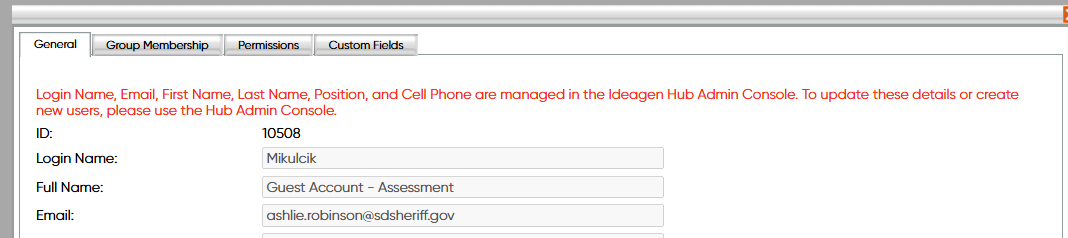
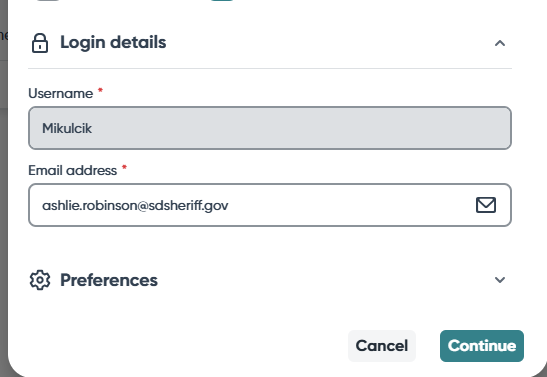
Note: This limitation has been reported to the Development Team and is being tracked as a known enhancement request for a future release.
Working around the limitation
To update a user's username, you must disable the existing user account and create a new user with the desired username.
- Go to Administration.
- Select Personnel.
- Find and select the user from the list.
- Disable the existing user account.
- Create a new user with the desired username.
- Reconfigure any necessary user permissions, roles, or assignments on the newly created account.
Important: Any permissions, roles, or assignments from the original account will need to be manually reconfigured on the new account.