


New article
Recently updated
Enabling the Ideagen Please Review integration

Who is this article for?
Administrators wanting to enable the Ideagen Please Review integration.
System Setting Administration permissions required.
Ideagen Quality Management Core integrates with Ideagen Please Review so editors can run a collaborative draft review on a controlled document before it goes for approval.
Overview
Reviewers comment and mark up the draft in an embedded Please Review window within Ideagen Quality Management Core, and the reviewed file comes back into Ideagen Quality Management Core when the review is completed.
The integration is off by default and is available in Ideagen Quality Management Core version 2026.10.0.0.
Note: The Ideagen Please Review integration is for Ideagen Quality Management Core Hosted Standard customers with a Please Review subscription, and whose Ideagen Quality Management Core and Ideagen Please Review tenants are on the same Mazlan Home platform.
Checking integration requirements
Before enabling the integration, ensure your environment meets these requirements:
| Requirement | Details |
|---|---|
| Ideagen Quality Management Core version and hosting | 2026.10.0.0 or later, Hosted Standard. |
| Mazlan Home | Ideagen Quality Management Core and Ideagen Please Review tenants onboarded to the same Mazlan Home; users sign in through Mazlan Home. |
| Users | The editor and every participant are active in both Ideagen Quality Management Core and Ideagen Please Review, linked to Mazlan Home. |
| Ideagen Please Review licences | Per user. A licence is used while someone owns or takes part in a review and is released when the review is completed. |
| Supported file types | doc, docx, docm, dot, dotm, dotx, rtf, pdf |
| Supported browsers | Google Chrome, Microsoft Edge, Mozilla Firefox |
| Language | The embedded Ideagen Please Review window is in English only, whatever language Ideagen Quality Management Core is set to. |
Enabling the integration
To enable the Ideagen Please Review integration:
- Go to Administration.
- Select System Settings.
- Select Please Review.
- Select Enable Please Review.
- Enter the Please Review Base URL (for example https://yourcompany.IdeagenPleaseReview.net).
- Enter the Impersonation Access Key (found in Please Review Admin Menu › System › Trusted Clients).
- Optionally set Review End Date (Days). Blank means seven days.
- Select Save.
- Select Test Connection.
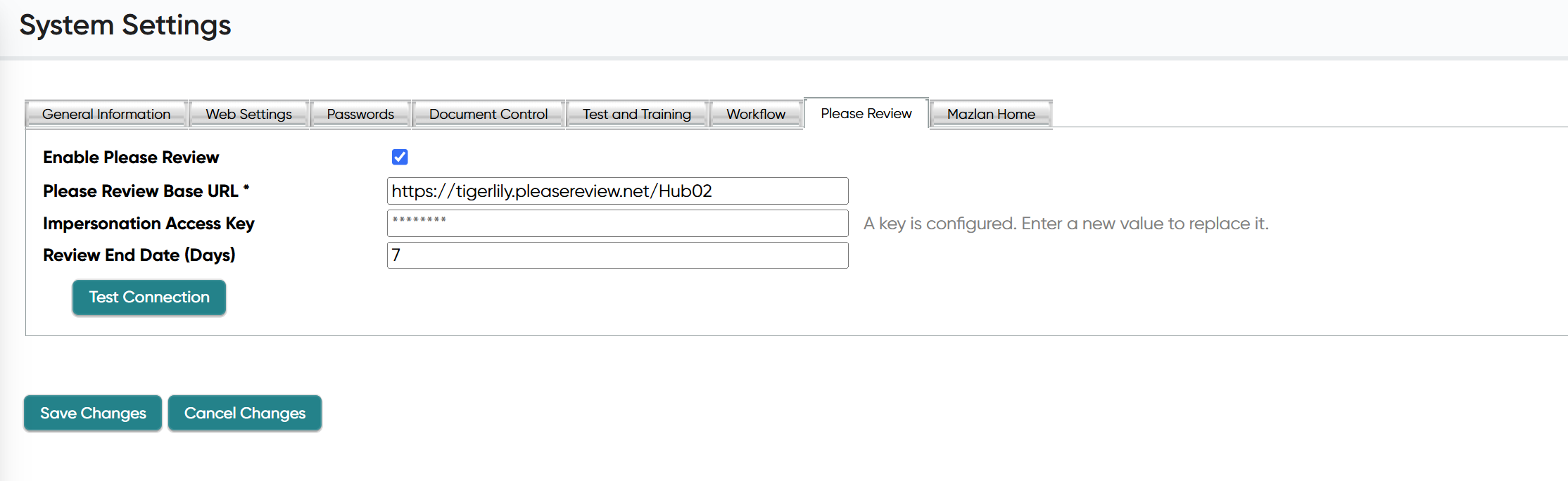
Note: The Please Review tab appears only when Mazlan Home is enabled for your tenant.
Understanding important considerations
- Check in any checked-out documents before you turn the integration on
- The access key is stored encrypted and shown masked after saving. Leave it unchanged to keep it, or enter a new key to replace it
- Reviews are created in Ideagen Please Review workgroup one by default. Contact Ideagen Support to use a different workgroup
- Allow your Ideagen Please Review site on your network. The review window loads your Please Review site (the Please Review Base URL) inside Ideagen Quality Management Core. If your organisation uses a web filter, proxy or browser policy to block websites, ask your IT team to allow that address. Otherwise the review window may appear blank